CVE-2025-59201 - Network Connection Status Indicator (NCSI) EoP
It’s been a while since I last dug into a Patch Tuesday release. With an extraordinarily high number of 177 CVEs, including 6 that were either already public or exploited in the wild, the October 2025 one seemed like a good opportunity to get back at it. The one I ended up investigating in depth was CVE-2025-59201, an elevation of privilege in the “Network Connection Status Indicator”.
MSRC Vulnerability Summary
CVE-2025-59201 is a typical local privilege escalation vulnerability, with a CVSS score of 7.8. According to MSRC criteria, its severity is “important”, not critical, which is understandable because it first requires the execution of code locally. It also mentions that the issue stems from an “Improper Access Control”.
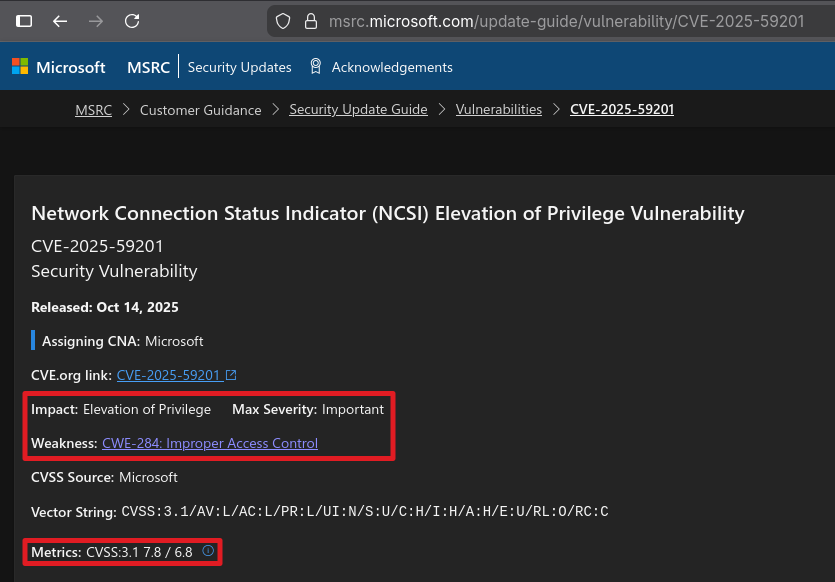 High-level description of CVE-2025-59201
In the FAQ section, we can read that successful exploitation of this vulnerability results in the execution of arbitrary code as NETWORK SERVICE, and that the discovery of the bug is credited to @t0zhang.
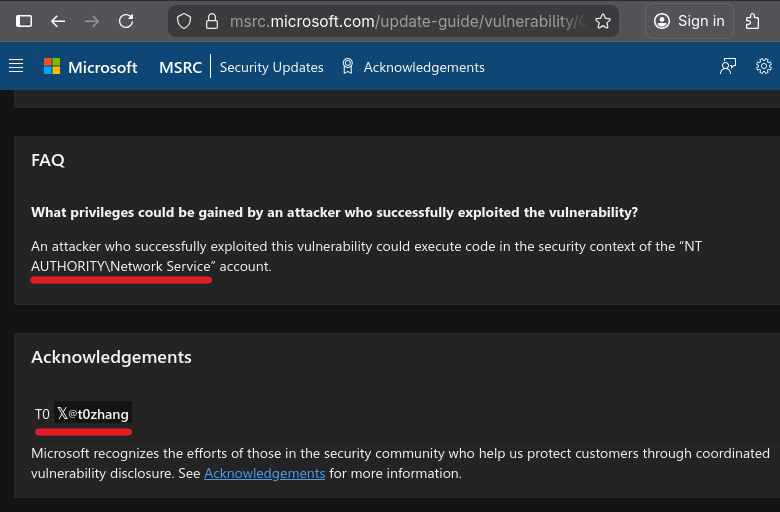 FAQ and acknowledgment of CVE-2025-5920
From NETWORK SERVICE, it is trivial to escalate to SYSTEM thanks to a trick James Forshaw demonstrated years ago. So, that seemed like an interesting issue to investigate.
Patch Analysis
The usual methodology for analyzing a patch is “binary diffing”, but what are we looking for? Microsoft published a short article providing a brief overview of the Network Connection Status Indicator (NCSI) feature. The name basically says it all. It is the feature that shows the end user if Windows is has access to the Internet.
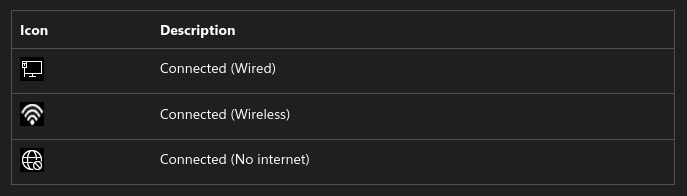 NCSI status icons
We also learn that the feature was previously hosted in the “Network Location Awareness” (NLA) service, but as of Windows 11, it now has its own service named “Network List Manager”. Surprisingly (?), there is no service named “Network List Manager” on Windows 11 24H2, but there is a service named “Network List Service”, whose short name is netprofm.
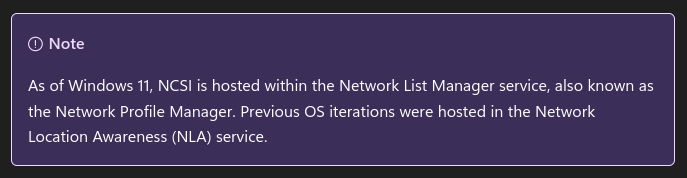 Note about the service hosting the NCSI feature
A quick look at the modules loaded in this service tends to confirm that this is the right target. We can see that it loads a DLL conveniently named ncsi.dll.
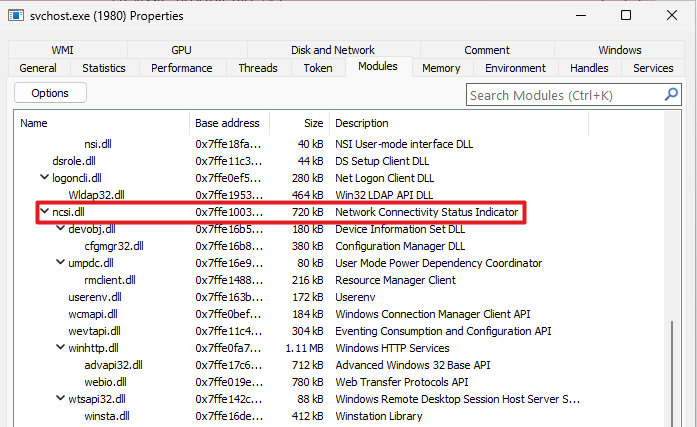 Modules loaded in the Network List service
My testing environment is a Windows 11 24H2 x64 VM. The MSRC page states that the KB ID corresponding to this version of the OS is KB5066835. We now have all the information we need to grab the patched version of ncsi.dll and the one just before on Winbindex.
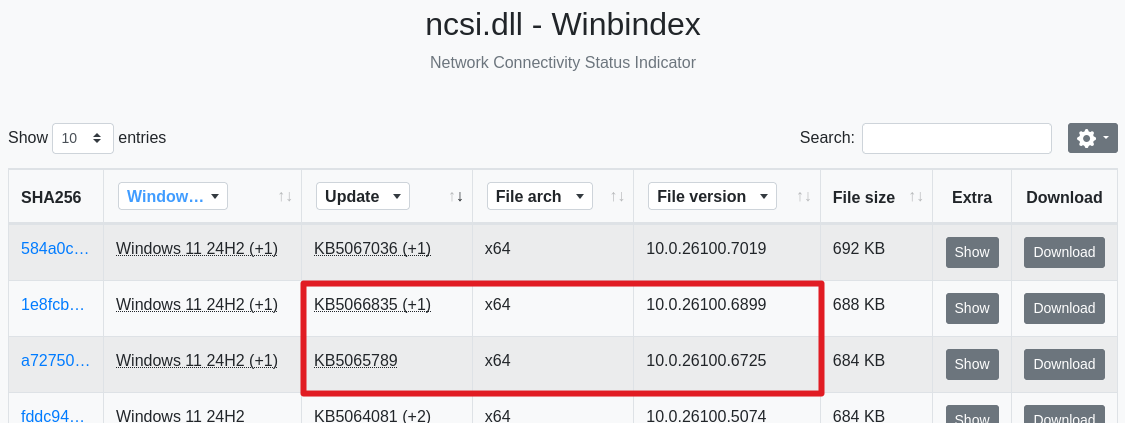 Versions of ncsi.dll available on Winbindex
I’ll spare you the disassembly and the BinDiff report generation. The result is rather unequivocal. BinDiff shows that a single function named StoreNcsiIEProxyString was updated.
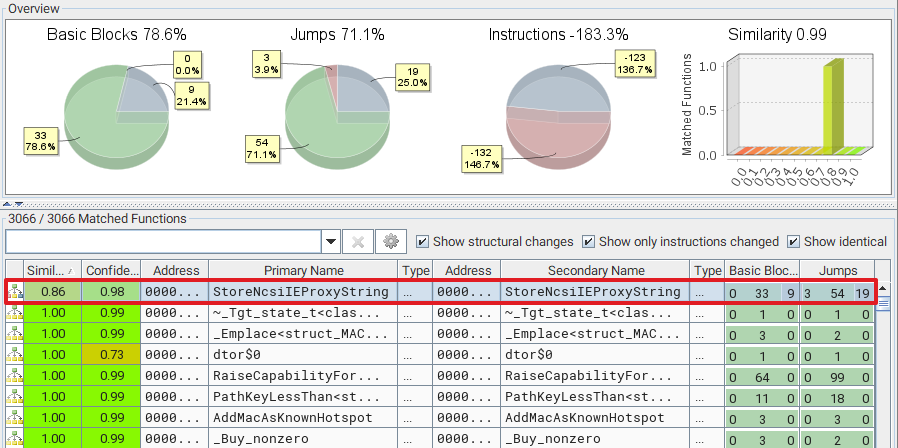 BinDiff highlights a single updated function
The “Secondary Unmatched Functions” section also provides an interesting bit of information. A function named ContainsRelativePathDoubleDot was added to the patched version.
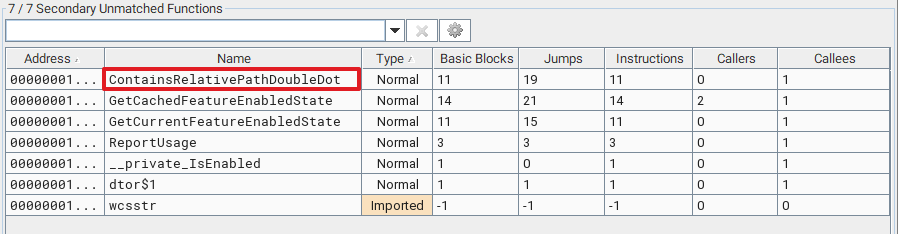 Unmatched functions in the patched version of ncsi.dll
Below is an overly simplified version of the relevant section of code that was patched in StoreNcsiIEProxyString. Essentially, this function allocates and creates a string of the form <0|1><param_1> (1), where param_1 is the first parameter passed to the function (e.g. 1foobar). Then, it checks whether this string contains .. (2). If it doesn’t, it sets it as a value in a registry key whose path is not immediately visible in the code (3). Step 2 is the only addition, compared to the previous version of the DLL.
1
2
3
4
5
6
7
8
9
10
11
12
13
14
15
16
17
18
19
20

void __cdecl StoreNcsiIEProxyString(ushort *param_1, bool param_2) {
    LPWSTR pwszProxyString;
    LPCWSTR pwszBoolVal;
    // ...
    pwszBoolVal = param_2 ? L"1" ? L"0";
    // [1] Create the string "<0|1><param_1>", e.G. "1foobar
    StringCchPrintfExW(
        pwszProxyString, stProxyStringSize, p_Var7, NULL, STRSAFE_NULL_ON_FAILURE,
        L"%s%s", pwszBoolVal, param_1);
    // ...
    // [2] Check whether the string value contains ".."
    bPathContainsDoubleDot = ContainsRelativePathDoubleDot(param_1);
    if (!bPathContainsDoubleDot) {
        // ...
        // [3] Set the string value "<0|1><param_1>" in the registry
        LVar2 = RegSetValueExW(hKey, NULL, 0, 1, pwszProxyString, cbProxyStringSize);
        // ...
    }
    // ...
}
Based on the name of the function, we know that it has something to do with proxy settings. So, to determine which registry key is modified, we can start Procmon, modify our proxy settings, and see if something interesting shows up in the logs.
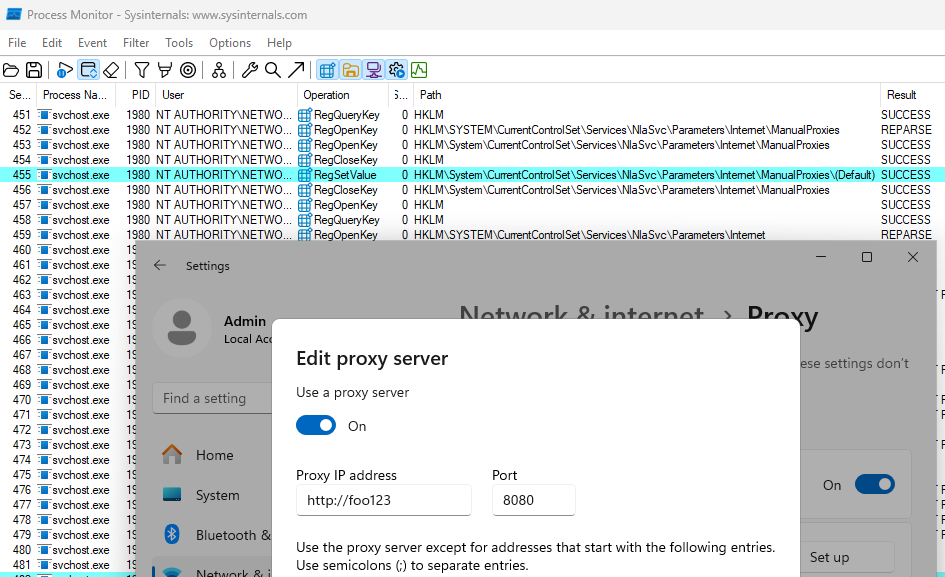 Proxy value being written in the registry
In this example, we can see that setting http://foo123:8080 as a proxy URL resulted in the value 1http://foo123:8080 being written to the registry key HKLM\...\NlaSvc\Parameters\Internet\ManualProxies. We can also check out the “Stack” view to confirm that the call to RegSetValueExW originated from the function StoreNcsiIEProxyString.
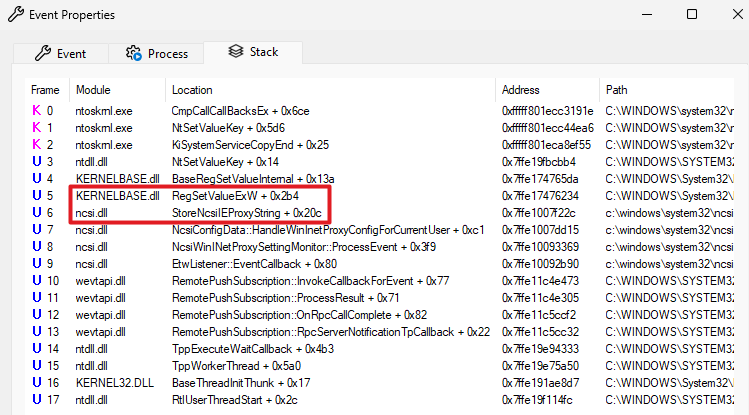 Stack view showing the call to RegSetValue originating from StoreNcsiIEProxyString
That’s it, this is the vulnerability. We can coerce the Network List Service to write a string value containing “..” in the registry and thus use a path traversal to… Oh wait, to do what actually? 
The Actual Vulnerability
It turns out the patch in ncsi.dll only told a fraction of the story, and was even misleading. However, at that stage, I didn’t know that, so I went down a few rabbit holes.
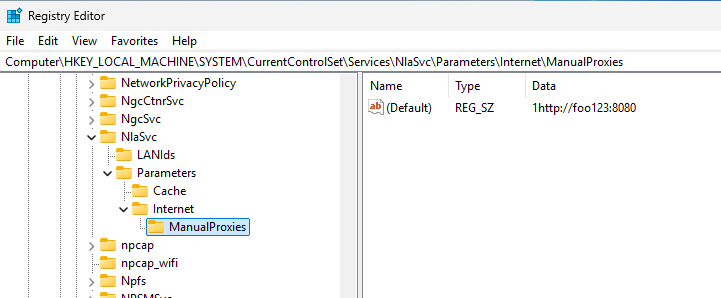 Default value of the ManualProxies key in the registry
The first thing that came to my mind was the Registry String Redirection feature. It can be used to retrieve string values dynamically by referencing a DLL containing the target string rather than setting it directly in the registry. For instance, you can set the value @shell32.dll,-12345 to indicate that the string value is stored in the resource with ID 12345 within shell32.dll. This poses a number of issues, though. The first character of the string value is either 0 or 1 and we cannot influence that, so we would be missing the initial @ symbol. Also, even if we manage to work around this constraint, the DLL would most certainly be loaded as an “image resource” or “data file”, so no code would be executed.
Then, I checked the DACL of the registry key ManualProxies and found that “Interactive” users have the “Set Value” permission. So I thought, maybe we can use a registry symbolic link to make this value point to an arbitrary location in HKLM and coerce the netprofm service to write to this location instead.
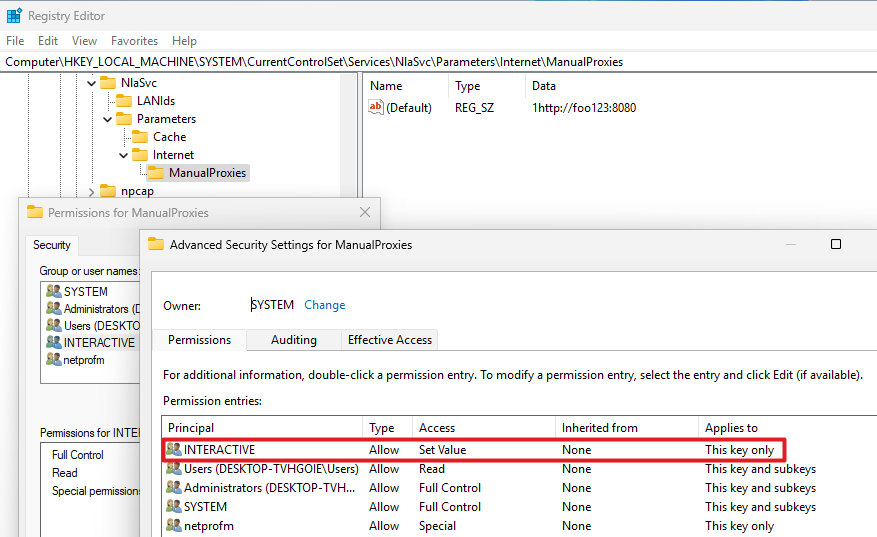 Interactive users have the “Set Value” permission on the target registry key
We could create a value named SymbolicLinkValue to specify the target path of the symbolic link, because we have the “Set Value” permission, but this wouldn’t work because the registry key must be created with the REG_OPTION_CREATE_LINK flag set. Without that it won’t be interpreted as a symbolic link. Although this idea could not work as is, it put me on the right track.
If you remember the description of the vulnerability, it indicated that the issue was due to an “Improper Access Control”. To be fair, this kind of information is not always 100% reliable, so I didn’t trust it initially. The patch seemed like it fixed an “Improper Input Validation”, not an “Improper Access Control”. So, what if the vulnerability wasn’t in the code, but simply in a registry DACL?! 
So, I compared the DACLs of the registry keys in HKLM\SYSTEM\CurrentControlSet\Services\NlaSvc between a vulnerable system and a patched system, with a focus on low-privileged identities.
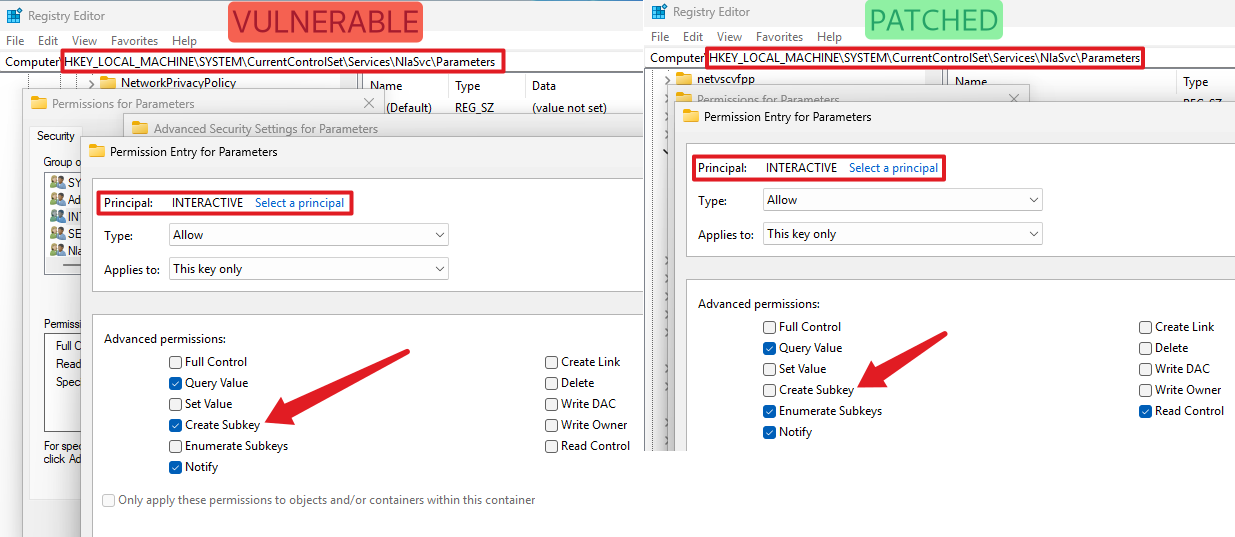 Comparison of the DACLs of the “Parameters” registry key
I found that the DACL of the Parameters key underwent a few changes. Most notably, the ACE corresponding to the INTERACTIVE identity previously allowed the creation of subkeys. This right was removed in the patched version. This is the actual vulnerability. In the end, it was just a simple DACL issue on a registry key, and the vulnerability description was correct.
Registry Value Write Trigger
The original action that triggered the RegSetValueExW API call in the Network List service was a modification of the proxy settings through the Settings app. This means that there is some kind of inter-process communication involved. As per the stack view in Process Monitor, it looks like an ETW event was received and handled by the method EtwListener::ProcessEvent of the ncsi.dll module.
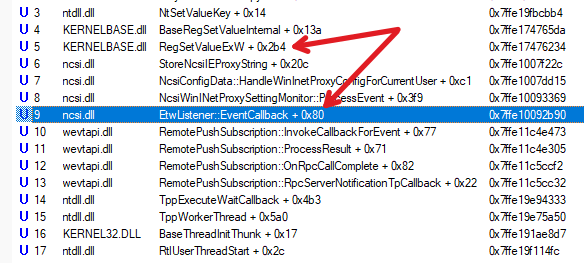 Stack view showing a call to EtwListener::ProcessEvent
I used EtwExplorer to list the ETW providers currently registered and found one named Microsoft-Windows-WinINet-Config.
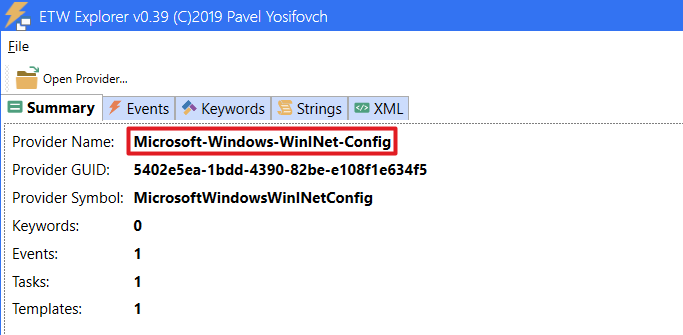 EtwExplorer showing high-level information about the Microsoft-Windows-WinINet-Config ETW provider
In the “Events” tab, we can see that it has a single event with a set of properties that matches our use case.
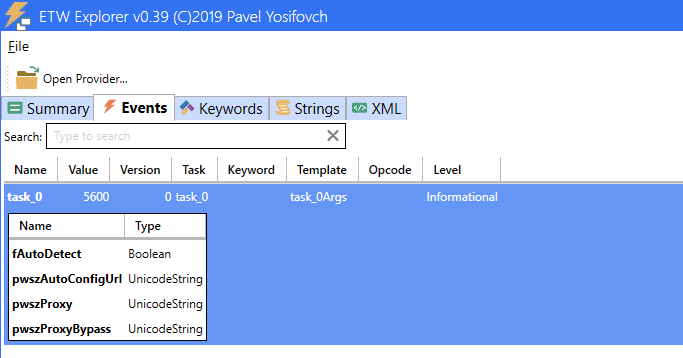 EtwExplorer showing the event associated with the Microsoft-Windows-WinINet-Config ETW provider
Writing ETW events isn’t super intuitive but, thankfully, detailed sample code is provided in the article Writing Manifest-based Events, which helped me put together a proof-of-concept quite quickly.
1
2
3
4
5
6
7
8
9
10
11
12
13
14
15
16
17
18
19
20
21
22
23
24
25
26
27
28
29
30
31
32
33
34
35
36
37
38
39
40
41
42
43
44
45
46
47
48
49
50
51

#include <Windows.h>
#include <evntprov.h>
#include <evntrace.h>
#include <iostream>

typedef struct _PROXY_SET_EVENT
{
    BOOL bAutoDetect;
    LPCWSTR pwszAutoConfigUrl;
    LPCWSTR pwszProxy;
    LPCWSTR pwszProxyBypass;
} PROXY_SET_EVENT, *PPROXY_SET_EVENT;

int main()
{
    ULONG status;
    REGHANDLE hRegHandle = NULL;
    GUID guidProviderID = { 0x5402e5ea, 0x1bdd, 0x4390, { 0x82, 0xbe, 0xe1, 0x08, 0xf1, 0xe6, 0x34, 0xf5 } };

    // [1] Register the provider (ID obtained with ETWExplorer)
    status = EventRegister(&guidProviderID, NULL, NULL, &hRegHandle);
    wprintf(L"EventRegister: %d (0x%08x)\n", status, status);

    PROXY_SET_EVENT pse = { 0 };
    EVENT_DESCRIPTOR ed = { 0 };
    EVENT_DATA_DESCRIPTOR edd[4] = { 0 };

    pse.pwszAutoConfigUrl = L"foo123"; // Dummy auto-config URL value for testing
    pse.pwszProxy = L"";
    pse.pwszProxyBypass = L"";

    // [2] Populate the event descriptor with even ID and level
    ed.Id = 5600; // Value obtained with ETWExplorer
    ed.Level = TRACE_LEVEL_INFORMATION; // Value obtained with ETWExplorer

    // [3] Populate the structures describing the data
    EventDataDescCreate(&edd[0], &pse.bAutoDetect, sizeof(pse.bAutoDetect));
    EventDataDescCreate(&edd[1], pse.pwszAutoConfigUrl, (ULONG)((wcslen(pse.pwszAutoConfigUrl) + 1) * sizeof(*pse.pwszAutoConfigUrl)));
    EventDataDescCreate(&edd[2], pse.pwszProxy, (ULONG)((wcslen(pse.pwszProxy) + 1) * sizeof(*pse.pwszProxy)));
    EventDataDescCreate(&edd[3], pse.pwszProxyBypass, (ULONG)((wcslen(pse.pwszProxyBypass) + 1) * sizeof(*pse.pwszProxyBypass)));

    // [4] Create the ETW event
    status = EventWrite(hRegHandle, &ed, ARRAYSIZE(edd), edd);
    wprintf(L"EventWrite: %d (0x%08x)\n", status, status);

    // [5] Close the provider
    status = EventUnregister(hRegHandle);
    wprintf(L"EventUnregister: %d (0x%08x)\n", status, status);

    return 0;
}
And it worked! The ETW event successfully triggered the call to RegSetValueExW with the value submitted in the event data.
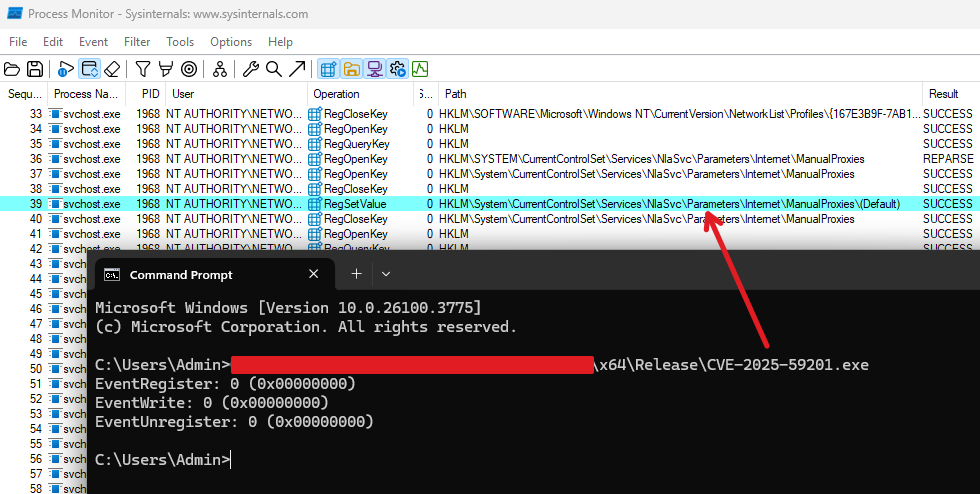 Proof-of-Concept using EventWrite to trigger the RegSetValue operation in the Network List service
Exploitation
A “simple” vulnerability doesn’t automatically imply a simple exploitation. Besides, there was a major caveat which threw me off track. I spent a few days trying to figure out to exploit this CreateSubKey right in conjunction with the arbitrary value write in the context of the Network List service. At some point, I deemed the time investment wasn’t worth it, so I gave up, and decided to try and contact the author. Thankfully, @t0zhang answered my message very quickly, and kindly offered some answers to my questions, and even provided their full proof-of-concept. With their consent, I’m going to share some of those details here.
There were several clever tricks involved. First, although crafting ETW events manually like I did worked, this wasn’t necessary as it was possible to set proxy settings in the current user’s registry hive, and then call the documented Win32 APIs InternetSetOption(A/W) with the flags INTERNET_OPTION_SETTINGS_CHANGED and INTERNET_OPTION_REFRESH to trigger the ETW event, and thus achieve the same result.
The second aspect is the one I completely missed. Unless you start with a fresh install, the ...\NlaSvc\Parameters\Internet registry key likely already exists. Therefore, on the one hand you have the right to create the Internet key, which you could leverage to manipulate the arbitrary registry value write with a symbolic link, but on the other hand, it serves no purpose since it already exists, and you don’t have the necessary rights to delete it and recreate it.
Therefore, the idea was to first delete the ...\NlaSvc\Parameters\Internet. To do so, the author exploited what seems very much like a vulnerability in the scheduled task \Microsoft\Windows\Customer Experience Improvement Program\Consolidator, which runs as SYSTEM. First, you need to create several registry keys under \SOFTWARE\Microsoft\SQMClient\CommonUploader\Paths, such as ...\Paths\1\2\to_delete, and start the scheduled task named Consolidator
1

schtasks /run /tn  "\Microsoft\Windows\Customer Experience Improvement Program\Consolidator"
What you’ll observe is that an executable named wsqmcons.exe will very nicely delete all the registry keys you created recursively.
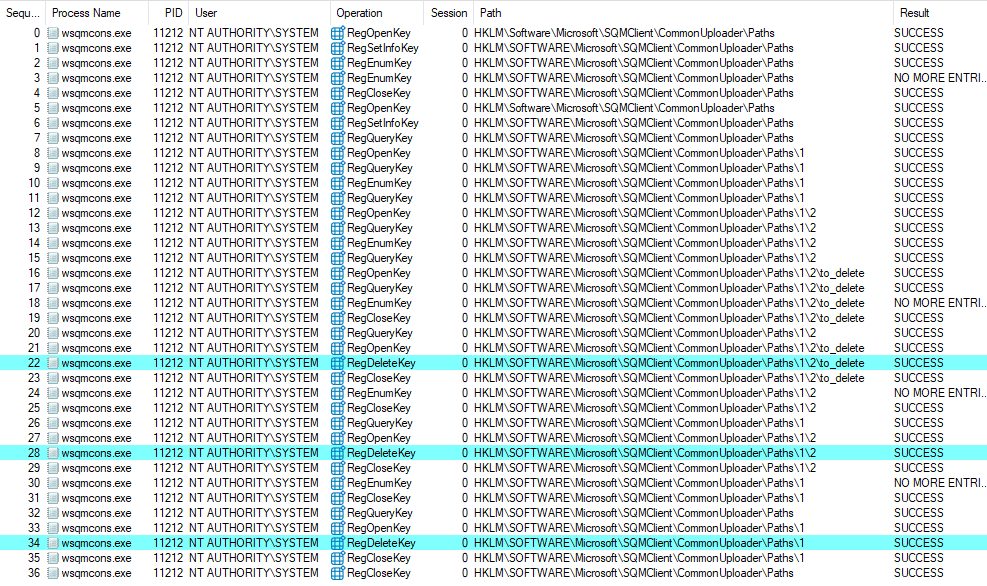 Registry keys being deleted by the “wsqmcons.exe” executable
By setting a symbolic link on the to_delete key, pointing to ...\NlaSvc\Parameters\Internet, and starting this scheduled task, you can therefore trigger its deletion. Then, we can recreate the key with a permissive DACL so that we can later modify it as we please.
With the ...\NlaSvc\Parameters\Internet key under our control, we can finally create the subkey ManualProxies with the REG_OPTION_CREATE_LINK flag, and set a symbolic link to redirect the registry value write to an arbitrary location.
Lastly, the author leveraged the arbitrary registry value write to set the (Default) value of the registry key HKLM\SYSTEM\CurrentControlSet\Services\TPM\WMI to \..\..\..\..\C:\foo.dll. To be completely honest, I don’t fully understand how writing a DLL path here is supposed to result in code execution in the context of NETWORK SERVICE. I used Procmon to log the filesystem and registry activity during boot after setting this registry value manually and observed no event related to it. Perhaps there is a way to trigger the execution, though I didn’t ask. Nonetheless, the exploitation path to get there was interesting enough, so I won’t spend more time digging.
2026-03-14 Update: I checked with @t0zhang again. The proof-of-concept exploit was never meant to result in true code execution as
NT AUTHORITY\SYSTEM, or evenNT AUTHORITY\NETWORK SERVICE. The path traversal was merely used to showcase the potential of the vulnerability in case a service would load a DLL from a writable(default)registry key value.
Links & Resources
- CVE-2025-59201 - Network Connection Status Indicator (NCSI) Elevation of Privilege Vulnerability
https://msrc.microsoft.com/update-guide/vulnerability/CVE-2025-59201 - Microsoft - NCSI overview
https://learn.microsoft.com/en-us/windows-server/networking/ncsi/ncsi-overview - Creating Registry Links
https://scorpiosoftware.net/2020/07/17/creating-registry-links/ - EtwExplorer
https://github.com/zodiacon/EtwExplorer